Adidas Logo with Python Turtle 05/05/201905/05/2019 | Karissa SitepuKarissa Sitepu | 2 Comments | 8:27 pm Categories: Difficulty Level 3 Adidas Logo Tags: fun shapes, logo 2 thoughts on “Adidas Logo with Python Turtle” Can I have the commands? import turtle turtle.setup(1000,1000) turtle.setworldcoordinates(-200,-150,200,250) turtle.tracer(0,0) turtle.begin_fill() turtle.circle(100,90,200) turtle.right(270) turtle.circle(100,90,200) turtle.end_fill() turtle.up() turtle.goto(-10,0) turtle.down() turtle.seth(45) turtle.begin_fill() turtle.circle(100,90,200) turtle.right(270) turtle.circle(100,90,200) turtle.end_fill() turtle.up() turtle.goto(-20,0) turtle.down() turtle.seth(90) turtle.begin_fill() turtle.circle(100,90,200) turtle.right(270) turtle.circle(100,90,200) turtle.end_fill() turtle.pensize(20) turtle.up() turtle.color(“white”) turtle.goto(-200,56) turtle.down() turtle.fd(400) turtle.pensize(20) turtle.up() turtle.color(“white”) turtle.goto(-200,40) turtle.down() turtle.fd(400) turtle.pensize(20) turtle.up() turtle.color(“white”) turtle.goto(-200,24) turtle.down() turtle.fd(400) turtle.update() Comments are closed. Post navigation PREVIOUS Previous post: Domino’s Pizza Logo with Python TurtleNEXT Next post: Sam’s Club Logo with Python Turtle Related Post Circle Matrix with Python Turtle (with Solution)Circle Matrix with Python Turtle (with Solution) 02/25/201902/25/2019 | J & J Coding AdventureJ & J Coding Adventure | 0 Comment In this simple python turtle project, you are going to draw a 10×10 matrix of connected circles. You can either use nested loops or define a function that draws a READ MOREREAD MORE Multiplication TableMultiplication Table 02/27/201902/27/2019 | J & J Coding AdventureJ & J Coding Adventure | 0 Comment Use turtle’s write() function to draw the following multiplication table. READ MOREREAD MORE Colorful SpiralColorful Spiral 04/09/201904/09/2019 | Steven GuSteven Gu | 0 Comment Code a spiral made of colors randomly picked from a set and make it look like this: READ MOREREAD MORE
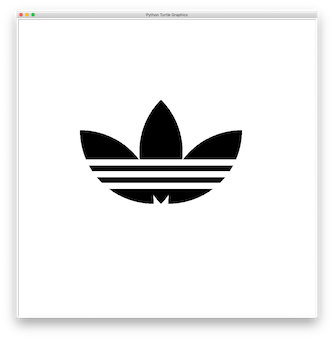
import turtle turtle.setup(1000,1000) turtle.setworldcoordinates(-200,-150,200,250) turtle.tracer(0,0) turtle.begin_fill() turtle.circle(100,90,200) turtle.right(270) turtle.circle(100,90,200) turtle.end_fill() turtle.up() turtle.goto(-10,0) turtle.down() turtle.seth(45) turtle.begin_fill() turtle.circle(100,90,200) turtle.right(270) turtle.circle(100,90,200) turtle.end_fill() turtle.up() turtle.goto(-20,0) turtle.down() turtle.seth(90) turtle.begin_fill() turtle.circle(100,90,200) turtle.right(270) turtle.circle(100,90,200) turtle.end_fill() turtle.pensize(20) turtle.up() turtle.color(“white”) turtle.goto(-200,56) turtle.down() turtle.fd(400) turtle.pensize(20) turtle.up() turtle.color(“white”) turtle.goto(-200,40) turtle.down() turtle.fd(400) turtle.pensize(20) turtle.up() turtle.color(“white”) turtle.goto(-200,24) turtle.down() turtle.fd(400) turtle.update()
Circle Matrix with Python Turtle (with Solution)Circle Matrix with Python Turtle (with Solution) 02/25/201902/25/2019 | J & J Coding AdventureJ & J Coding Adventure | 0 Comment In this simple python turtle project, you are going to draw a 10×10 matrix of connected circles. You can either use nested loops or define a function that draws a READ MOREREAD MORE
Multiplication TableMultiplication Table 02/27/201902/27/2019 | J & J Coding AdventureJ & J Coding Adventure | 0 Comment Use turtle’s write() function to draw the following multiplication table. READ MOREREAD MORE
Colorful SpiralColorful Spiral 04/09/201904/09/2019 | Steven GuSteven Gu | 0 Comment Code a spiral made of colors randomly picked from a set and make it look like this: READ MOREREAD MORE
Can I have the commands?
import turtle
turtle.setup(1000,1000)
turtle.setworldcoordinates(-200,-150,200,250)
turtle.tracer(0,0)
turtle.begin_fill()
turtle.circle(100,90,200)
turtle.right(270)
turtle.circle(100,90,200)
turtle.end_fill()
turtle.up()
turtle.goto(-10,0)
turtle.down()
turtle.seth(45)
turtle.begin_fill()
turtle.circle(100,90,200)
turtle.right(270)
turtle.circle(100,90,200)
turtle.end_fill()
turtle.up()
turtle.goto(-20,0)
turtle.down()
turtle.seth(90)
turtle.begin_fill()
turtle.circle(100,90,200)
turtle.right(270)
turtle.circle(100,90,200)
turtle.end_fill()
turtle.pensize(20)
turtle.up()
turtle.color(“white”)
turtle.goto(-200,56)
turtle.down()
turtle.fd(400)
turtle.pensize(20)
turtle.up()
turtle.color(“white”)
turtle.goto(-200,40)
turtle.down()
turtle.fd(400)
turtle.pensize(20)
turtle.up()
turtle.color(“white”)
turtle.goto(-200,24)
turtle.down()
turtle.fd(400)
turtle.update()