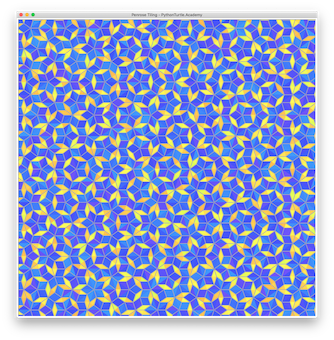
Penrose Tiling with Python Turtle 04/18/201904/18/2019 | J & J Coding AdventureJ & J Coding Adventure | 0 Comment | 10:35 pm Categories: colorsys Difficulty Level 10 list loop math random recursion Penrose tiling is a beautiful non-periodic tiling method. Draw it with your favorite color combination. Penrose Tiling with Python Turtle Tags: list, loop, math, recursion, tessellation Post navigation PREVIOUS Previous post: Find Different Color Game with Python TurtleNEXT Next post: Colorful Penrose Tiling with Python Turtle Related Post 60 Tilted Circles 260 Tilted Circles 2 03/04/201903/04/2019 | J & J Coding AdventureJ & J Coding Adventure | 0 Comment In a previous project, you drew 60 titled circles (Turtle’s heading directions are different). Compare the difference and draw this new shape. READ MOREREAD MORE Let It SnowLet It Snow 03/04/201903/04/2019 | J & J Coding AdventureJ & J Coding Adventure | 0 Comment Create a list of snowflakes and let them fall slowly with random drifting movement. Video of this animation: READ MOREREAD MORE 3D Tessellation Effect with Python Turtle3D Tessellation Effect with Python Turtle 04/17/201904/17/2019 | J & J Coding AdventureJ & J Coding Adventure | 0 Comment Use parallelogram and square to fill the plane. Add shades to the shapes to have 3D effect. READ MOREREAD MORE
60 Tilted Circles 260 Tilted Circles 2 03/04/201903/04/2019 | J & J Coding AdventureJ & J Coding Adventure | 0 Comment In a previous project, you drew 60 titled circles (Turtle’s heading directions are different). Compare the difference and draw this new shape. READ MOREREAD MORE
Let It SnowLet It Snow 03/04/201903/04/2019 | J & J Coding AdventureJ & J Coding Adventure | 0 Comment Create a list of snowflakes and let them fall slowly with random drifting movement. Video of this animation: READ MOREREAD MORE
3D Tessellation Effect with Python Turtle3D Tessellation Effect with Python Turtle 04/17/201904/17/2019 | J & J Coding AdventureJ & J Coding Adventure | 0 Comment Use parallelogram and square to fill the plane. Add shades to the shapes to have 3D effect. READ MOREREAD MORE