Watermelon 03/29/201903/29/2019 | IreneIrene | 2 Comments | 9:39 pm Categories: Difficulty Level 2 Draw a watermelon with eyes and mouth 🙂 Watermelon with Python Turtle Tags: basics 2 thoughts on “Watermelon” import turtle turtle.speed(0) turtle.up() turtle.circle(250,270) turtle.down() turtle.begin_fill() turtle.fillcolor(‘limegreen’) turtle.circle(250,180) turtle.left(90) turtle.fd(50) turtle.left(90) turtle.circle(-200,180) turtle.left(90) turtle.fd(50) turtle.end_fill() turtle.left(180) turtle.fd(50) turtle.right(90) turtle.begin_fill() turtle.fillcolor(‘red’) turtle.circle(200,180) turtle.left(90) turtle.fd(400) turtle.end_fill() turtle.up() turtle.goto(-130,230) turtle.down() turtle.begin_fill() turtle.fillcolor(‘black’) turtle.circle(25) turtle.end_fill() turtle.up() turtle.goto(-135,220) turtle.down() turtle.begin_fill() turtle.fillcolor(‘white’) turtle.circle(15) turtle.end_fill() turtle.up() turtle.goto(130,230) turtle.down() turtle.begin_fill() turtle.fillcolor(‘black’) turtle.circle(25) turtle.end_fill() turtle.up() turtle.goto(125,220) turtle.down() turtle.begin_fill() turtle.fillcolor(‘white’) turtle.circle(15) turtle.end_fill() turtle.up() turtle.pensize(10) turtle.goto(15,100) turtle.circle(15,270) turtle.down() turtle.circle(15,-180) Nice. It works! Comments are closed. Post navigation PREVIOUS Previous post: PopsicleNEXT Next post: Connect Four Game with Monte Carlo Tree and Python Turtle Related Post A Beautiful HouseA Beautiful House 02/26/201902/26/2019 | IreneIrene | 0 Comment Use your imagination to draw a beautiful house! READ MOREREAD MORE Facebook Logo with Python TurtleFacebook Logo with Python Turtle 05/05/201905/05/2019 | Ohm PatelOhm Patel | 0 Comment Find a font for letter ‘f’ and draw the Facebook Logo. READ MOREREAD MORE Dollar SymbolDollar Symbol 04/12/201904/12/2019 | Steven GuSteven Gu | 0 Comment Draw the dollar symbol 💰: READ MOREREAD MORE
import turtle turtle.speed(0) turtle.up() turtle.circle(250,270) turtle.down() turtle.begin_fill() turtle.fillcolor(‘limegreen’) turtle.circle(250,180) turtle.left(90) turtle.fd(50) turtle.left(90) turtle.circle(-200,180) turtle.left(90) turtle.fd(50) turtle.end_fill() turtle.left(180) turtle.fd(50) turtle.right(90) turtle.begin_fill() turtle.fillcolor(‘red’) turtle.circle(200,180) turtle.left(90) turtle.fd(400) turtle.end_fill() turtle.up() turtle.goto(-130,230) turtle.down() turtle.begin_fill() turtle.fillcolor(‘black’) turtle.circle(25) turtle.end_fill() turtle.up() turtle.goto(-135,220) turtle.down() turtle.begin_fill() turtle.fillcolor(‘white’) turtle.circle(15) turtle.end_fill() turtle.up() turtle.goto(130,230) turtle.down() turtle.begin_fill() turtle.fillcolor(‘black’) turtle.circle(25) turtle.end_fill() turtle.up() turtle.goto(125,220) turtle.down() turtle.begin_fill() turtle.fillcolor(‘white’) turtle.circle(15) turtle.end_fill() turtle.up() turtle.pensize(10) turtle.goto(15,100) turtle.circle(15,270) turtle.down() turtle.circle(15,-180)
A Beautiful HouseA Beautiful House 02/26/201902/26/2019 | IreneIrene | 0 Comment Use your imagination to draw a beautiful house! READ MOREREAD MORE
Facebook Logo with Python TurtleFacebook Logo with Python Turtle 05/05/201905/05/2019 | Ohm PatelOhm Patel | 0 Comment Find a font for letter ‘f’ and draw the Facebook Logo. READ MOREREAD MORE
Dollar SymbolDollar Symbol 04/12/201904/12/2019 | Steven GuSteven Gu | 0 Comment Draw the dollar symbol 💰: READ MOREREAD MORE


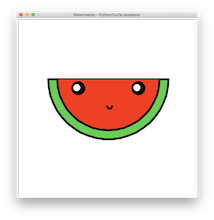

import turtle
turtle.speed(0)
turtle.up()
turtle.circle(250,270)
turtle.down()
turtle.begin_fill()
turtle.fillcolor(‘limegreen’)
turtle.circle(250,180)
turtle.left(90)
turtle.fd(50)
turtle.left(90)
turtle.circle(-200,180)
turtle.left(90)
turtle.fd(50)
turtle.end_fill()
turtle.left(180)
turtle.fd(50)
turtle.right(90)
turtle.begin_fill()
turtle.fillcolor(‘red’)
turtle.circle(200,180)
turtle.left(90)
turtle.fd(400)
turtle.end_fill()
turtle.up()
turtle.goto(-130,230)
turtle.down()
turtle.begin_fill()
turtle.fillcolor(‘black’)
turtle.circle(25)
turtle.end_fill()
turtle.up()
turtle.goto(-135,220)
turtle.down()
turtle.begin_fill()
turtle.fillcolor(‘white’)
turtle.circle(15)
turtle.end_fill()
turtle.up()
turtle.goto(130,230)
turtle.down()
turtle.begin_fill()
turtle.fillcolor(‘black’)
turtle.circle(25)
turtle.end_fill()
turtle.up()
turtle.goto(125,220)
turtle.down()
turtle.begin_fill()
turtle.fillcolor(‘white’)
turtle.circle(15)
turtle.end_fill()
turtle.up()
turtle.pensize(10)
turtle.goto(15,100)
turtle.circle(15,270)
turtle.down()
turtle.circle(15,-180)
Nice. It works!